
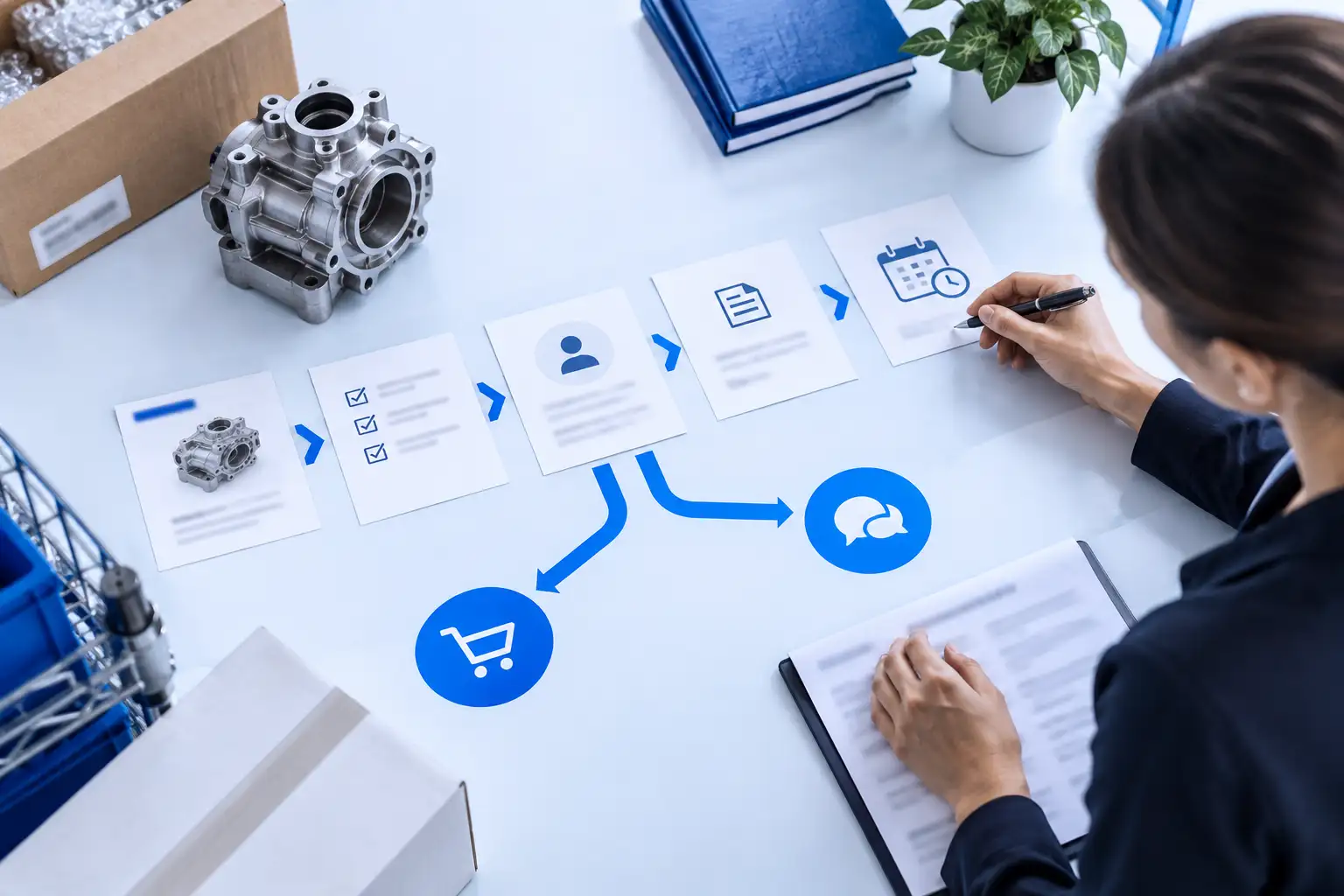
A B2B ecommerce website does not always lead every visitor towards the same checkout.
Some customers may know exactly what they need and want to place an order quickly. Others may need a quotation, advice on compatibility, account pricing, a larger quantity, technical clarification or help choosing between several options.
For manufacturers and specialist suppliers, the best ecommerce journey is often not a single route. It is a clear set of connected routes that allows customers to buy online when they are ready, while making it straightforward to ask for help when the purchase is more involved.
A well-planned B2B ecommerce enquiry journey should reduce uncertainty, collect useful information and give both the customer and the business a clear next step.
What is a B2B ecommerce enquiry journey?
A B2B ecommerce enquiry journey is the series of steps a potential customer follows when they need information, pricing, availability or assistance before completing a purchase.
It may begin on a product page, category page, search result or marketing landing page. From there, the visitor should be able to:
- Understand what the product or service is
- Decide whether it may be suitable
- Identify what information is still missing
- Choose between ordering and making an enquiry
- Provide enough detail for the business to respond usefully
- Know what will happen next
This is different from simply adding a contact form to a website. A generic form labelled “Send an enquiry” places too much responsibility on the visitor. They may not know what to include, who will receive the message or how quickly someone will respond.
The journey should be designed around the decisions customers are trying to make.
1. Start with clear product and service information
Before asking someone to make an enquiry, give them as much useful context as possible.
A B2B buyer may need to understand:
- Product dimensions and specifications
- Materials, finishes or configurations
- Typical applications
- Compatibility or technical requirements
- Minimum order quantities
- Availability or lead times
- Delivery options
- Whether the product is standard, configurable or bespoke
- Whether pricing is fixed, account-based or quotation-only
Not every detail will be available for every product. However, the page should make clear what is known and what needs to be confirmed.
A product page that says very little and immediately asks visitors to contact the sales team creates unnecessary friction. Customers may not yet have enough confidence to start a conversation.
Useful product information also improves the quality of enquiries. When visitors understand the basics, they can ask more specific questions and the sales team spends less time clarifying information that could have been provided online.
2. Offer different routes for different levels of complexity
A B2B ecommerce website should not force every customer through the same process.
A straightforward, stocked product may be suitable for online ordering. A product requiring configuration, volume pricing or technical approval may need a quotation. Some visitors may simply need to speak to someone before deciding.
Useful routes might include:
- Buy online for standard products with clear pricing and availability
- Request a quote for volume orders, bespoke requirements or account pricing
- Ask a question where the customer needs clarification
- Request a callback for customers who prefer a conversation
- Request a sample where physical evaluation is important
- Discuss your requirements for complex or project-led purchases
These options should not compete confusingly with one another. The page should explain which route is most suitable and why.
For example, a product page could state that standard quantities can be ordered online, while larger orders or alternative specifications can be discussed with the team. This reassures customers that they are not being pushed into an unsuitable checkout process.
3. Make the enquiry call to action specific
“Contact us” is familiar, but it is often too vague to be the strongest call to action.
A more useful label reflects the action the customer wants to take:
- Request a product quote
- Check availability
- Ask about bulk pricing
- Confirm compatibility
- Discuss a custom requirement
- Request a technical recommendation
Specific calls to action help visitors choose the right next step. They also help internal teams understand the purpose of the enquiry before opening it.
The call to action should appear at relevant points on the page, particularly near pricing, specifications and product options. It should remain easy to find on mobile devices without overwhelming the page with repeated buttons.
4. Build a form around the information the team needs
A good B2B enquiry form collects enough information to support a useful response, but does not create unnecessary work for the customer.
Depending on the enquiry type, useful fields might include:
- Name and business name
- Work email address
- Telephone number, if a call may be helpful
- Product or product reference
- Required quantity
- Delivery location
- Required date or project timescale
- Relevant dimensions, materials or specifications
- File upload for drawings, schedules or reference documents
- The customer’s question or additional context
Where the enquiry begins on a product page, pre-fill or pass through the product name and reference. Asking someone to type information that the website already knows is frustrating and increases the risk of errors.
Forms should also make optional fields genuinely optional. If a telephone number is not needed to answer an initial question, do not make it compulsory.
For complex products, a staged form may be more appropriate than a long single page. The first step can identify the general requirement, followed by more detailed questions only when they are relevant.
5. Support account customers without excluding new buyers
B2B ecommerce often serves a mixture of existing account customers, new customers and occasional purchasers.
Account customers may expect:
- Login-based pricing
- Agreed payment terms
- Saved delivery details
- Order history
- Repeat ordering
- Access to restricted products or documents
- A named contact or account manager
These features can make repeat purchasing much easier, but they should not create a barrier for new customers who want to ask a question or request a quote.
A visitor should not have to create an account before discovering whether a product is suitable. Nor should a new prospect be forced into a consumer-style checkout when the business normally assesses requirements first.
The journey should explain when an account is useful and when it is optional. If an account can be created after an enquiry or first order, make that clear.
6. Allow customers to save or refer to products
B2B purchases are often discussed internally before an order is placed. A buyer may need to compare options, share information with a colleague or return after receiving approval.
Helpful features can include:
- Add to a quote request
- Save for later
- Download a specification sheet
- Share a product link
- Add several products to one enquiry
- Refer to a previous enquiry or order
A quote basket can be particularly useful for suppliers with broad catalogues or configurable products. Instead of submitting separate forms for several items, the customer can gather relevant products and provide one set of requirements.
This supports a more realistic buying process while keeping the website connected to the eventual sales conversation.
7. Set expectations after submission
The confirmation stage is part of the enquiry journey, not an afterthought.
After submitting a form, the customer should receive clear confirmation that:
- The enquiry has been received
- The relevant product or requirement has been recorded
- The business will review the information
- The next step is understood
- The customer knows how to make contact if the matter is urgent
Avoid promising a response time unless the business can consistently meet it. If a typical response window is known and reliable, it can be useful to state it. Otherwise, explain what happens next without creating an unsupported expectation.
An email confirmation should repeat the important details submitted by the customer. This gives them an opportunity to identify mistakes and provides a useful reference while they wait.
8. Connect enquiries to internal follow-up
A polished front-end experience will not help if enquiries disappear into a shared inbox or are passed between teams without ownership.
Before launching a B2B ecommerce enquiry journey, agree:
- Who receives each type of enquiry
- Which team owns the first response
- How urgent requirements are identified
- Where customer details and product context are recorded
- How quotations are prepared and followed up
- What happens when an enquiry is incomplete
- How outcomes are tracked
Different forms may need different routes. A technical product question could go to a technical specialist, while a pricing request may need to reach sales or customer service.
The website should support the internal process rather than create a separate stream of unstructured messages.
9. Make assisted purchasing feel like part of ecommerce
Assisted purchasing is not a failure of ecommerce. For complex products, it can be the most appropriate way to help a customer move towards a successful order.
The website can do much of the early work by helping the visitor:
- Find a relevant product or category
- Understand the main options
- Identify what information is required
- Submit a structured request
- Receive a tailored response
- Continue towards a quote, account order or online purchase
This creates a connected journey rather than a choice between an automated store and a completely offline sales process.
For manufacturers and specialist suppliers, the aim is not always to remove human involvement. It is to make that involvement more informed, timely and useful.
10. Measure quality, not just form submissions
The number of enquiries received is only one measure of performance.
Useful questions include:
- Which product pages generate the most relevant enquiries?
- How many enquiries include enough information to quote?
- Which forms are abandoned?
- How often do customers choose a quote instead of ordering?
- How many enquiries become orders?
- Which questions are repeatedly asked by customers?
- How long does the team take to respond?
- Are customers using the right route for their needs?
These observations can inform improvements to product content, forms, calls to action and internal processes.
A lower number of better-qualified enquiries may be more valuable than a high volume of incomplete messages. The purpose of the journey is to help suitable customers progress, not simply to increase submissions.
A practical checklist
Before launching or reviewing a B2B ecommerce enquiry journey, check that:
- Product information answers the main early questions
- Online ordering and enquiry routes are clearly separated
- Calls to action describe specific actions
- Product details are carried into the form automatically
- The form asks only for useful information
- Account customers have an efficient route
- New customers are not blocked unnecessarily
- Customers can enquire about more than one product where appropriate
- Confirmation messages explain what happens next
- Enquiries are routed to an accountable team
- Follow-up outcomes can be reviewed
- The journey works well on mobile devices
- Accessibility and privacy requirements have been considered
The strongest B2B ecommerce journeys recognise that customers buy in different ways. Some want speed and independence. Others need reassurance, technical guidance or a tailored quotation.
By combining clear product information, suitable enquiry routes, structured forms and reliable follow-up, manufacturers and specialist suppliers can support both online ordering and more complex assisted purchases without making either experience feel secondary.
Not necessarily for every product, but it is useful where pricing, quantities, specifications, availability or delivery requirements vary. The quote route should be clearly explained and used where it genuinely helps the customer.
It should collect the product or products required, quantity, relevant specifications, delivery location, timescale and contact details. The exact fields should reflect what the sales or technical team needs to prepare a useful response.
Usually not. Requiring an account too early can prevent new prospects from asking questions or requesting a quotation. Account features should make repeat purchasing easier without blocking initial research or contact.
It can combine detailed product information with options such as technical questions, file uploads, sample requests, quote baskets and assisted purchasing. The website should explain what can be bought online and when specialist guidance is recommended.
Need a clearer ecommerce journey?
If your website needs to support online ordering, quote requests or more complex B2B purchases, Urbansoul can help you plan a clearer customer journey around your products, customers and business processes.
Get in touch to discuss your ecommerce project.
Related Services
Related News / Insights / Articles
-

What B2B Buyers Need From a Manufacturing Website Product Page
A practical guide to creating manufacturing product pages that answer buyer questions, explain technical information clearly and support more credible B2B enquiries.
-
WooCommerce for Manufacturing: A Practical Solution to B2B Ecommerce?
For many manufacturers, the idea of selling online can feel like a poor fit. Your products may have complex pricing structures, customer-specific discounts, bespoke manufacturing options, or lengthy sales processes that don’t neatly fit into a standard ecommerce checkout. As a result, many manufacturers assume platforms like WooCommerce are designed for consumer brands rather than…